
The Uwell Caliburn series was originally developed as a simple entry-level solution for people who wanted to switch from pre-filled devices like disposable vapes to refillable vapes. The series has come a long way since then, though, as the market and user base have matured. Today’s Caliburn users run the full range from complete beginners to experienced vapers who demand a lot from their hardware.
Wherever you happen to be in your vaping journey, the Uwell Caliburn G4 Pro is designed to be a perfect fit for you. It’s a rare pod system that’s completely straightforward for a beginner but has the power and flexibility to grow with you as your demands and requirements change. It’s easily one of the best pod vapes on the market today – and in this review, we’ll introduce it to you.
View the Uwell Caliburn G4 Pro now. If you’d like to research further, you can also browse our full collection of Uwell vapes or read our complete guide to the Uwell Caliburn series.
How Much Does the Uwell Caliburn G4 Pro Cost?

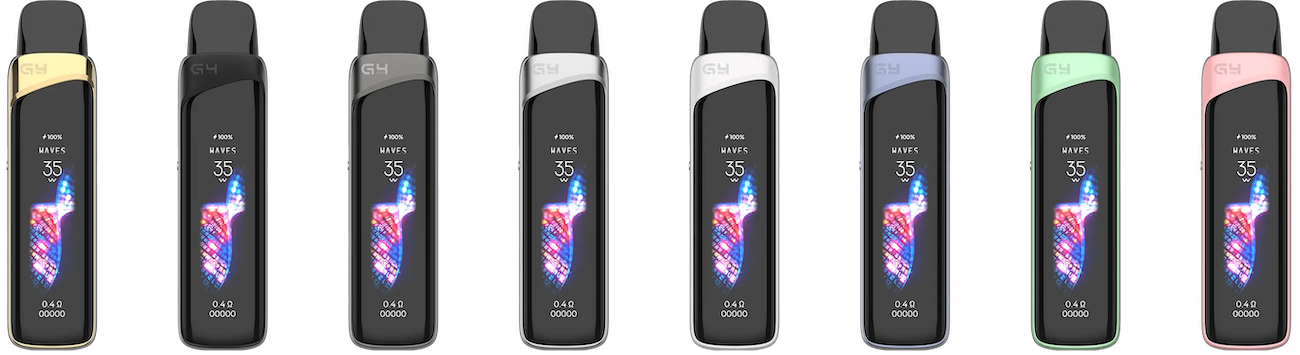
The Caliburn G4 Pro kit costs $28.99 at the time of writing, and it’s available in eight beautiful colors. The kit includes the Caliburn G4 Pro device along with two Caliburn GPP pods and an instruction manual.
Pods cost $8.95 per pack of four, and we suggest adding an extra pack to your order to ensure that you’ll have plenty of spares available in case a pod burns out early. Caliburn GPP pods are available in resistances of 0.4, 0.6, 0.9 and 1.2 ohm. The kit includes the 0.4- and 0.6-ohm pods.
Uwell Caliburn G4 Pro Specifications

- Device Type: Refillable pod vape with adjustable power and touch-screen control
- Battery Capacity: 1,800 mAh; battery provides up to seven days of vaping between charges depending on usage patterns
- Pod Capacity: 3ml
- Vaping Modes Supported: Direct wattage control plus pre-configured or custom power delivery curve
- Maximum Power: Up to 35 watts
- Firing Style: Inhale-activated firing
- Smart Display: High-resolution touch screen; described in detail below
- Adjustable Airflow: Yes
Uwell Caliburn G4 Pro Features

High-Resolution Touch Screen
The most important feature of the Caliburn G4 Pro is the enormous high-resolution touch screen that consumes the entire front of the device. The screen looks absolutely amazing and is easily one of the best displays we’ve ever seen on any vape. It’s bright, sharp and colorful. It comes with six animated visual themes, with three themes available from the start and a further three unlocked gradually as you use the device. The designers at Uwell did a great job with the themes, which are visually striking and add a fun illusion of depth.
Although a touch screen mainly exists to add visual appeal and help a vape stand out on store shelves, it’s ultimately not very relevant if it doesn’t enhance the experience of using the device in some way. Physical buttons have served vapers quite well for a long time; can a touch screen really make things better in some way?
In the past, touch screens on vapes were mainly novelties that actually made the devices harder to use in the long run. The Caliburn G4 Pro, however, is entirely different and is actually easier to control than a vape with buttons because it supports both taps and swipes. Here are a few examples of how it works.
- To change the visual theme, you swipe across the screen horizontally.
- To change the wattage, you tap the current wattage, swipe up or down and tap the check mark.
- To change the vaping mode, you tap the current mode, tap the new mode and tap the checkmark.
- To reset the puff counter, you tap it and tap the reset button.
All of these things are faster than the usual method of interacting with a small single-button vape, and the best part is that it’s completely intuitive because all that you need to do is tap the thing you want to change. Until someone else manages to come up with something better, this feels like the best way that you can possibly interact with a vaping device.
New Power Delivery Curves

The Caliburn G4 Pro doesn’t just give you a new way of interacting with your vape. It also changes the actual vaping experience because you’re not just choosing the wattage – you’re also choosing the power delivery curve. Basically, what that means is that the device makes slight tweaks to the output at the beginning, middle and end of the puff. Once again, the high-resolution screen is a huge benefit because you can see exactly what type of experience you’ll have before you select it.
The Caliburn G4 has two pre-programmed modes along with a third mode you can customize. Here’s how they work.
- Waves: Starts out gently and gradually ramps up the vapor and warmth as the puff continues.
- Storm: Starts with a burst of vapor and lowers the power to prevent burning during long puffs.
- Custom: Allows you to choose your own power levels for the beginning, middle and end of the puff.
Like everything else about the Caliburn G4 Pro, the vaping modes are completely intuitive. You’ll understand them immediately because the screen shows you what you’re going to get.
Fixing Problems with the Uwell Caliburn G4 Pro
Although the Caliburn G4 Pro is probably more intuitive than any other advanced vape, the fact that it has so many features and settings means there are more things that you’ll need to check if the device isn’t working as it should. In this walkthrough, we’ll describe some of the situations that you might encounter with this device and explain how to fix them.
Not Charging
If the battery indicator doesn’t light up when you connect a charging cable to your Caliburn G4 Pro, follow these steps to fix it.
- Replace the charging cable. The Caliburn G4 Pro unfortunately doesn’t include a cable, which means that you’ll have to use your own. That increases the chance of using a cable that might work for other purposes but is a bit too worn out to adequately deliver power to your vape.
- Try connecting the Caliburn G4 Pro to a different power source. You can try a wall adapter, for instance, if the device doesn’t seem to charge through your computer. Don’t charge the Caliburn G4 Pro with a high-speed charger for a phone or tablet.
- Clean the charging port. You can use a toothpick to remove any dust or lint that could be blocking the port.
Not Hitting
If your Caliburn G4 isn’t hitting when you puff on it, the solution is probably simpler than you think. Here’s what you should do.
- Check for a peel-away film on the bottom of the pod. The film is there to prevent the battery from draining while the device is in the box because it ships with the first pod already installed. Remove the film and discard it.
- Make sure that the Caliburn G4 Pro isn’t turned off. You can turn the device on and off by pressing the button five times.
- Remove the pod and check for leaked e-liquid under it. It’s normal to see a little condensation under the pod – you can simply remove it with a cotton swab – but a large amount of vape juice indicates a more serious issue. See the section below for help fixing the leak.
- Replace the pod if nothing else fixes the issue. You could be using a pod that’s damaged or defective.
Leaking
If you see a large amount of e-liquid under the Caliburn G4 Pro pod, follow these steps to prevent it from happening in the future.
- Don’t overfill the pod. If you add too much vape juice, you’ll push some of it out when you close the pod.
- Make sure that the pod is completely closed after filling it.
- Puff a little more gently. You can cause the coil to flood if you use too much air pressure. If your Caliburn G4 Pro gurgles, you’re puffing too firmly.
Tastes Burnt
If your Caliburn G4 Pro tastes burnt when you puff on it, try these three fixes.
- Reduce the wattage – particularly if you enjoy longer puffs. Although the Caliburn G4 Pro can operate at up to 35 watts, the higher power levels are mainly meant for shorter puffs.
- Try using a custom power curve that starts out with a higher power level and reduces the power gradually.
- Replace the pod if you’ve been using it for a while. Any vape pod will begin to produce a burnt flavor after extended use because e-liquid residue will collect on the coil.
Uwell Caliburn G4 Pro Review: Our Expert Perspective

If you’re looking for a vape that’s small but powerful, the Uwell Caliburn G4 Pro is perfect for just about every use case. If you’re new to vaping, you’ll love the set-it-and-forget-it quality that allows you to choose your favorite pre-configured mode and just enjoy. More experienced vapers, meanwhile, will appreciate the fact that the Caliburn G4 Pro has the power and flexibility to provide pretty much any type of experience that you could possibly want in an incredibly small package.
The fact that the Caliburn G4 Pro has such a great combination of simplicity and flexibility means that it can grow with you. There’s no reason why this can’t be your very first vape – and if it is, it’s going to be a very long time before you feel an urge to upgrade.
Best Points
- Touch-screen interface looks spectacular and is very easy to use
- Simple enough for beginners but has the power and flexibility to grow with you
- Very affordable for what you get
Could Be Improved
- Doesn’t include a charging cable