
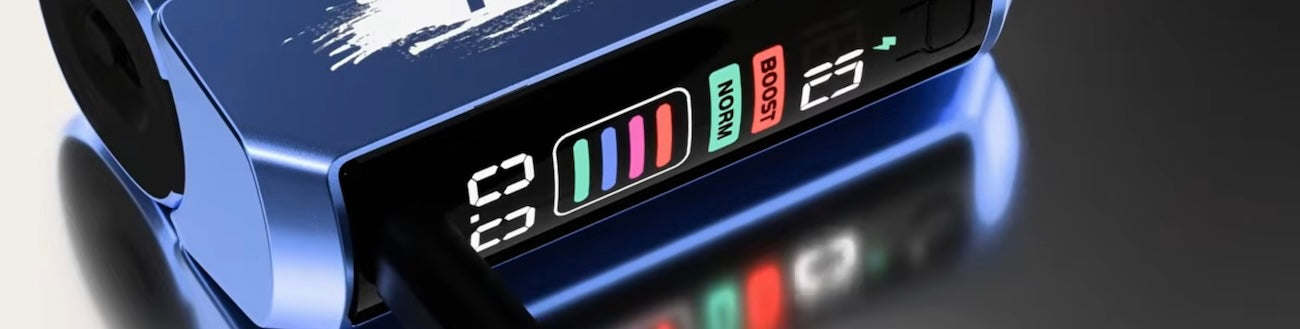
The Foger Switch Pro is one of the most popular vapes on the market today, thanks to a winning combination of a huge flavor selection and a completely unique design. The uniqueness of Foger’s design isn’t just in the way the device looks, though – it’s also in how it works. The Foger Switch Pro is a two-piece disposable vape, and both components have batteries. That can lead to some confusion when you’re trying to figure out how to charge your Foger vape for the first time. In this guide, we’ll walk you through it.
What You Need to Charge a Foger Vape

To charge your Foger vape, you need these things:
- Foger Switch Pro kit, including one Foger vape refill and one battery dock
- USB-C cable
- Computer with USB port or USB wall adapter with 5-volt, 1-amp output
The top reason why people look for information about how to charge a Foger vape is because they don’t actually have all of the required components. The Foger Switch Pro is sold in two different types of packages. You can buy the full kit, or you can buy just the refill pods.
If your first purchase happened to be just the pod instead of the kit, you’ve undoubtedly noticed that it doesn’t have a USB port. That’s probably the source of the confusion that brought you here. The Foger pod charges through a magnetic connection, so there’s no way to charge a Foger vape without the battery dock.
If you have all of the above components, you can charge your Foger vape.
How to Charge Your Foger Vape
To charge your Foger vape, follow these steps.
- To charge the Foger battery dock, connect it to your computer or a compatible USB power source with a USB-C cable. While the dock charges, the battery indicator at the top of the smart display begins to increase. The dock is fully charged when the indicator reaches “100.”
- To charge the Foger pod, connect it to the dock. When the dock is charging the pod, a lightning bolt icon appears at the top of the smart display. When the icon disappears, the pod is fully charged. As long as you keep the pod connected, the dock will top up the pod’s battery automatically as you use the device.
The Foger dock and pod have a combined battery capacity of 1,050 mAh. If both are completely dead, charging them will take a little over an hour.
There’s no need to charge the dock and pod separately. If you connect the pod to the dock before connecting the Foger vape to a USB power source, both batteries will charge.
When Do You Need to Charge the Foger Vape?
- The Foger dock has a smart display with a battery indicator on it. When the indicator reaches “00,” it’s time to charge the dock. Both the dock and the pod will stop working at this point because the dock can no longer charge the pod’s battery.
- The Foger pod doesn’t have a battery indicator. When its battery is dead, the pod will simply stop working.
How Can You Tell the Foger Vape Is Charging?

- You can tell that the Foger battery dock is charging because the battery percentage indicator on the smart display will increase.
- You can tell that the Foger pod is charging because a lightning bolt icon appears on the dock’s smart display.
How Long Does the Foger Vape Take to Charge?
The Foger Switch Pro has a total battery capacity of 1,050 mAh, with 850 mAh in the dock and 200 mAh in the pod.
- Charging the dock through a USB power source takes a little under an hour.
- Charging the pod through the dock takes around 20 minutes.
- Charging the dock and pod together takes a little over an hour.
If your Foger vape seems like it’s taking too long to charge, refer to the “Foger Vape Isn’t Charging” section below.
Why Does the Lightning Bolt Keep Turning On and Off?
This is normal behavior. The lightning bolt icon appears on the Foger vape’s smart display when the dock is charging the pod. If you’re using the pod and dock together, the dock will top up the pod’s battery periodically – so you’ll see the lightning bolt appear and disappear.
What to Do if Your Foger Vape Isn’t Charging
Troubleshooting a charging issue with the Foger vape is a little more complicated than with most other disposable vapes because of the Switch Pro’s two-part design. Here’s how to handle it.
- If the smart display doesn’t turn on when you connect the Foger dock to a power source, the dock isn’t charging.
- If the lightning bolt icon doesn’t appear on the smart display when you connect the pod to the dock, the pod isn’t charging.
Here’s what to do next depending on the issue you’re experiencing.
Foger Dock Isn’t Charging
Follow these steps if your Foger dock isn’t charging.
- Replace the USB-C cable. Faulty cables cause most charging problems with vapes, so it’s likely that your Foger dock will start charging if you just use a new cable.
- Change the power source. Your computer’s USB port is always the most reliable power source for charging your Foger vape. You can also use a wall adapter with a 5-volt, 1-amp output. Don’t risk overloading your Foger vape with a fast charger for a smartphone.
- Clean the USB port. If you’ve been carrying your Foger vape in your pocket, lint in the port could be preventing the dock from charging properly.
Foger Pod Isn’t Charging
Follow these steps if your Foger pod isn’t charging.
- Remove the dock and reconnect it. If the pod wasn’t charging because of a transient connection issue, this should get it working.
- Rotate the pod slightly in the dock. The pod won’t charge unless all of the contact points are touching, and rotating the pod may fix an alignment issue.
- Make sure that the contact points are clean and aren’t stuck. You can clean them using a cotton swab with a very small amount of rubbing alcohol. Push the pins gently and make sure that they spring back to their original positions.
What About Charging Other Foger Vapes?
At the time of writing, the Foger Switch Pro is the only Foger vape with a two-part design. Foger also makes a traditional one-part vape called the Foger Bit, and the charging procedure for that device is essentially the same as any other disposable vape.
- The Foger Bit has a smart display with a battery indicator. When the indicator reaches “00,” it’s time to recharge the device.
- To charge the Foger Bit, connect it to your computer or to a 5-volt, 1-amp USB wall adapter with a USB-C cable. As the battery charges, the number on the indicator will increase. The Foger Bit has an 850 mAh battery and takes a little under an hour to charge.
- When you connect the Foger Bit to a power source, the smart display should turn on. If it doesn’t, the device isn’t charging. To troubleshoot a Foger Bit that isn’t charging, you can follow the same steps described under “Foger Dock Isn’t Charging” above.
Charging a Foger Vape: Final Thoughts
Charging a Foger vape might be a little more complicated than it is with traditional one-piece disposable vapes, but the Switch Pro’s design has some major benefits. That’s why it’s so popular. To have a good experience with the Foger vape, you just need to know how to charge it. That comes down to two simple steps.
- Charge the dock with your computer or another USB charger. When the counter reaches “100,” the dock is fully charged.
- Charge the pod with the dock. When the lightning bolt icon disappears, the pod is fully charged. Since the pod doesn’t have a USB port, charging it does require the dock.